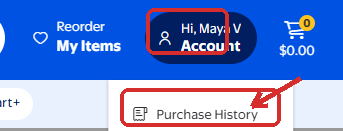
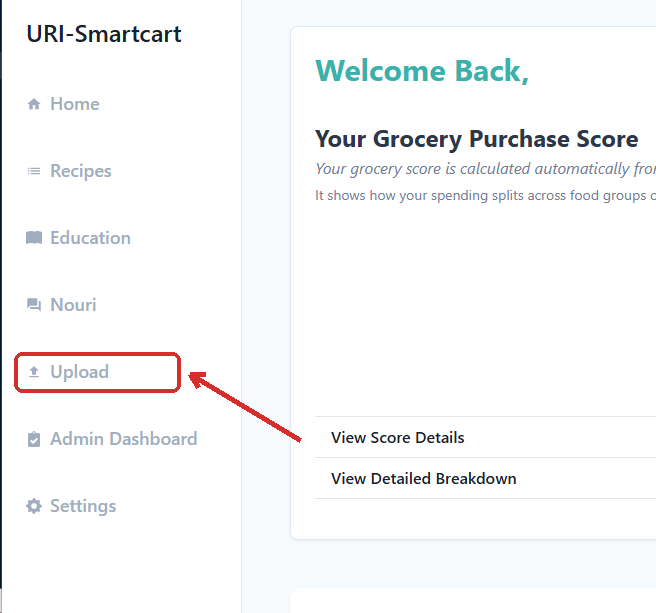
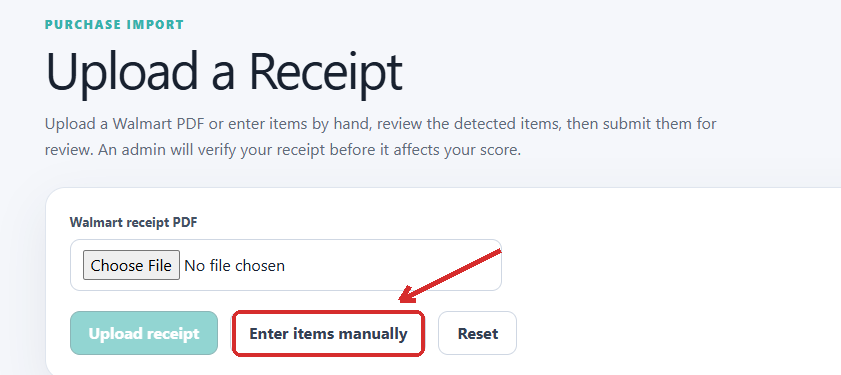
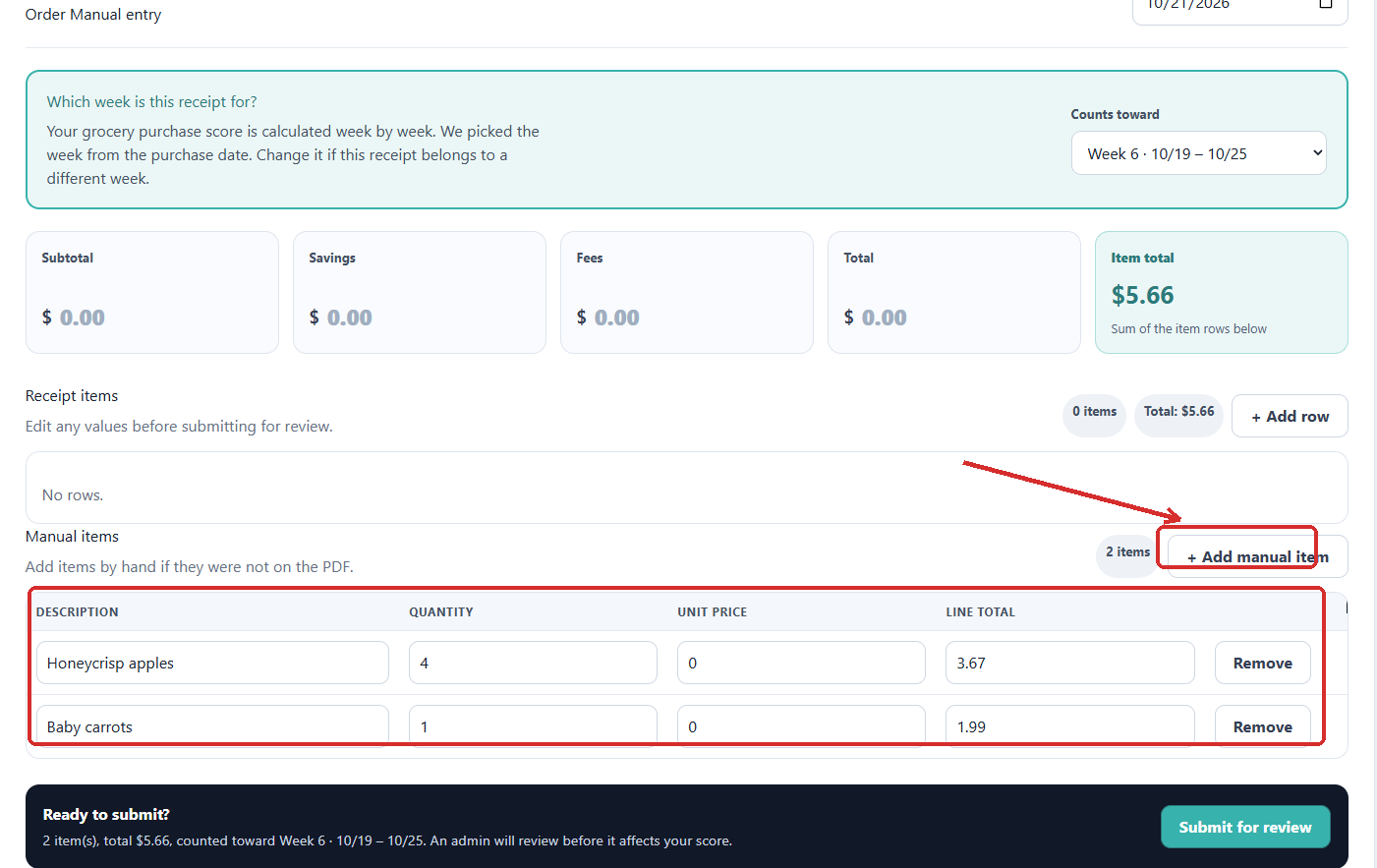
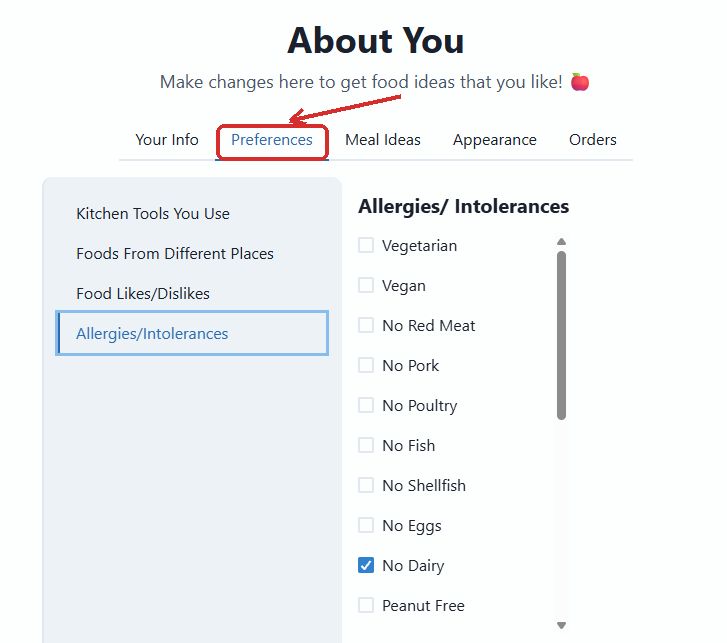
Can't find your answer here? Email us at urismartcart2.0@gmail.com and we'll help. In the pictures below, the red box shows what to click.
Uploading your purchases
Step 1: Sign in to your Walmart account at Walmart.com.
Step 2: Click on Account, then select Purchase History.
Step 3: Click on the purchase or order number for the trip you want to upload.

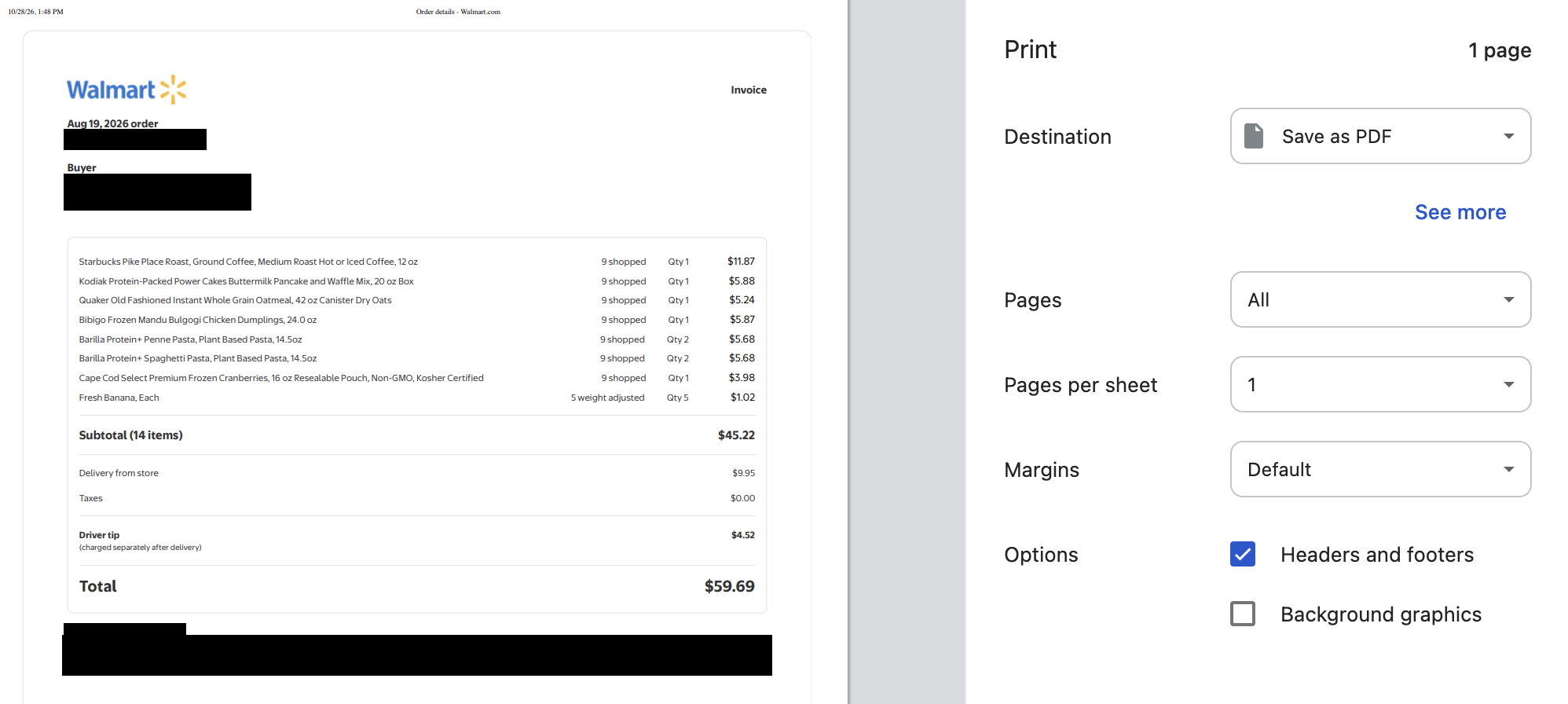
Step 4: In the top right corner, click Print invoice.

Step 5: In the print window, under Destination, select “Save as PDF.” (Do not select “Adobe PDF” — that option is not supported.) Click “Save” and save the file somewhere easy to find, such as your Downloads folder.
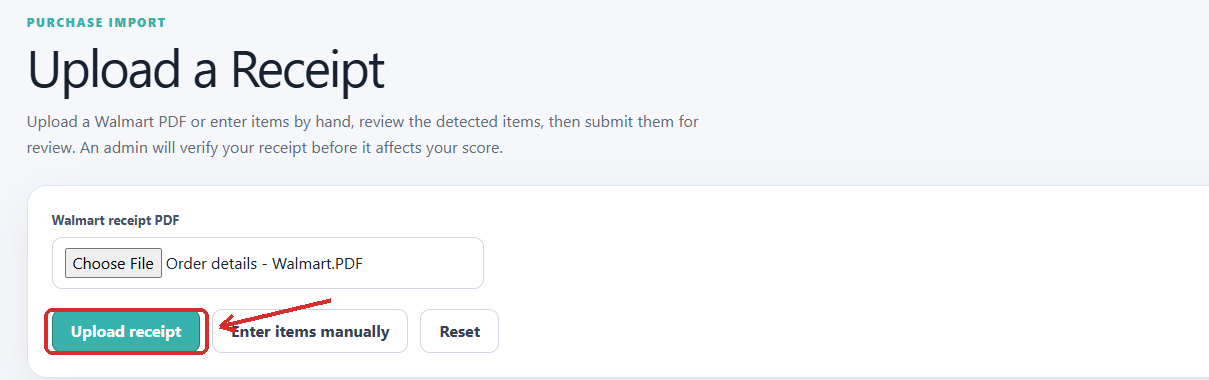
Step 6: In Smart Cart, go to the toolbar on the left and click Upload.
Step 7: Where it says Walmart receipt PDF, click Choose File and attach the PDF you just saved.
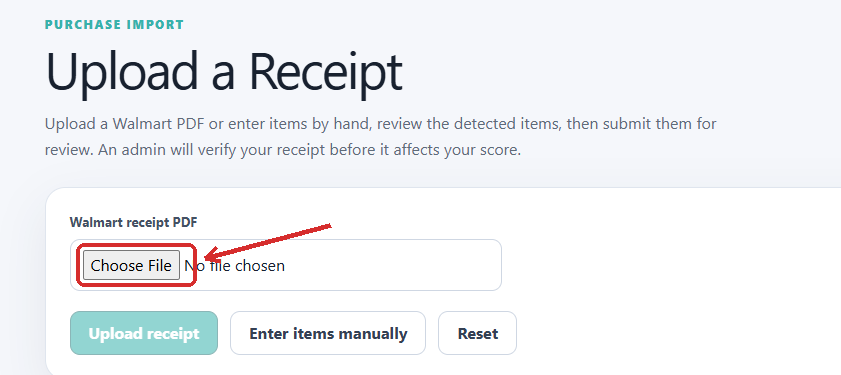
Step 8: Click Upload receipt.
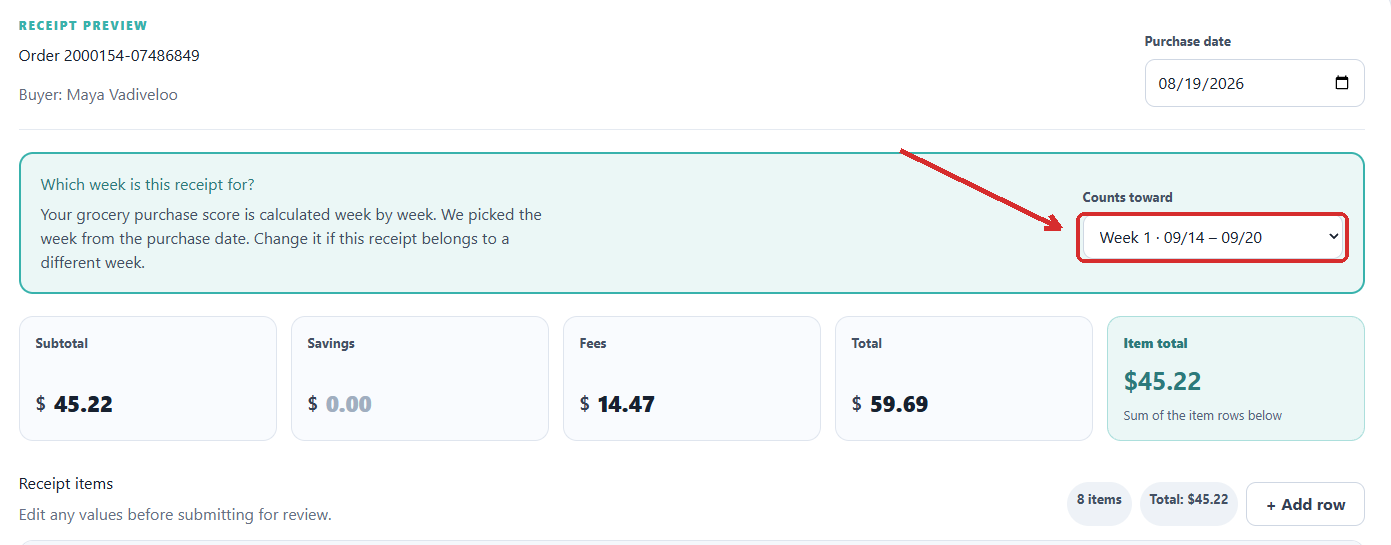
Step 9: Review your Receipt Preview. Check that the week shown under Counts toward is right and add any items by hand that were bought in store and are not on the PDF.
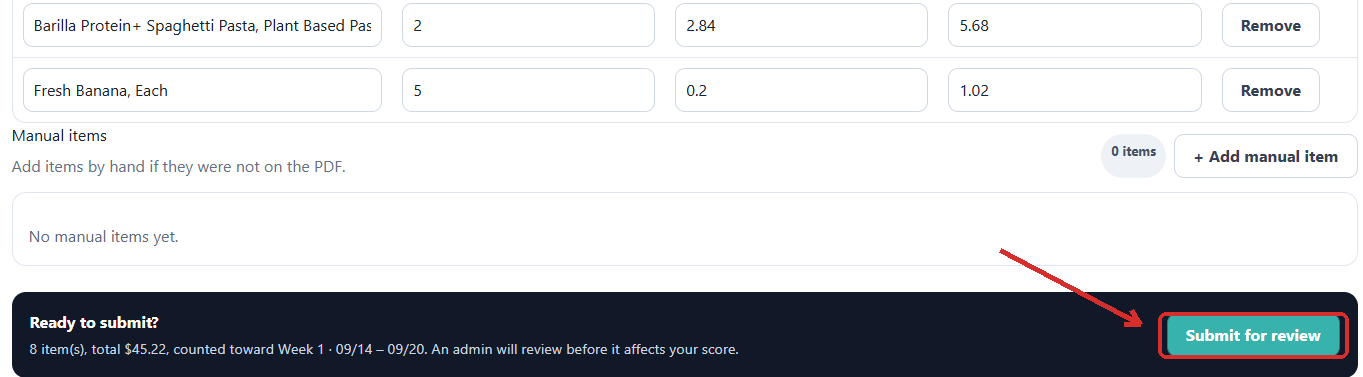
Step 10: When everything looks right, click Submit for review.
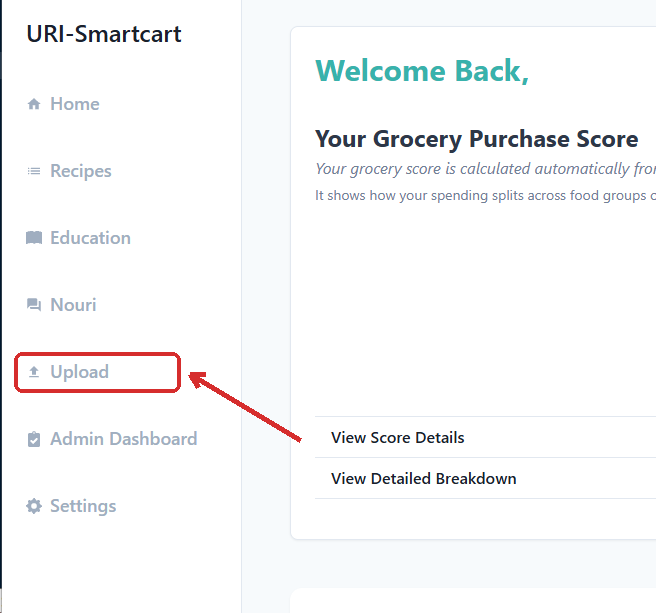
Step 1: In Smart Cart, go to the toolbar on the left and click Upload.
Step 2: Where it says Walmart receipt PDF, click Enter items manually.
Step 3: Click + Add manual item and enter each item with its quantity and price. Check that the week shown under Counts toward is right.
Step 4: Click Submit for review.
Step 5: Email a photo of your receipt to urismartcart2.0@gmail.com so we can check it against what you entered.
Shop wherever you like. The automatic upload only reads PDF invoices from Walmart.com, so purchases from anywhere else are added using Enter items manually, with a photo of the receipt emailed to urismartcart2.0@gmail.com.
Yes, all of them count toward your score. Walmart.com creates a PDF invoice for pickup and delivery orders, so those upload automatically. Items bought inside the store are added manually and count toward the same shopping week.
Yes, and please include it. Your grocery score is meant to reflect all the food coming into your home, not only what you buy yourself. Upload their Walmart.com invoices the same way you would your own and add in-store purchases manually.
A study administrator reviews and approves every receipt before it affects your score. Receipts are reviewed within 24 hours on weekdays between 9am and 5pm, and within 48 hours on weekends and holidays.
Email urismartcart2.0@gmail.com with the item name and the category it was given. We will correct it and update your score.
Understanding your scores
Your grocery score shows how your grocery spending is divided across food groups, compared with the mix found in a healthy shopping basket. It is calculated automatically from the receipts you upload, one week at a time, so there is nothing extra to log.
The score runs from 0 to 75 and combines eleven food categories. Eight are foods to eat more of, such as vegetables, whole grains and dairy, where more spending earns more points. Three are foods to limit — refined grains, sweets and sodas, and processed meats — where the scoring runs in reverse, so spending less on them earns more points.
Higher is better, but 75 is a ceiling rather than a target. In a national survey of US households, the middle score was 29.5 and half of all households scored between 21 and 37.
Prices in Smart Cart are shown after discounts, so an item that rang up at a promotional price appears at that lower price rather than the shelf price.
In the Receipt Preview, each item is listed with its quantity, the price for one unit, and the line total for all of them. If you bought four of something, the Unit price column shows the cost of one and the Line total column shows what you actually paid. The Item total adds up the line totals.
Your grocery score is calculated from your total food purchases, with delivery fees, service fees and store discounts removed.
The grocery score is based on how your spending is split, not on how much you bought. A large stock-up trip on other items raises your total spending, which makes every other category a smaller share of it. Buying more from the foods-to-limit categories in the same week can also pull the score down.
A category scores zero in any week you did not buy anything from it. This is common and expected: in a national survey, half of US households scored zero for Greens and Beans, Whole Grains and Seafood and Nuts in a given week. Anything you buy every couple of weeks will show as zero in the weeks you skip it.
If you would like ideas for adding more of these foods, ask Nouri for suggestions.
Because the score compares how your spending is divided, reaching 75 would mean splitting your grocery budget almost exactly the way the USDA food plans do. Very few households come close. Most score somewhere in the twenties and thirties, so a score in that range is normal rather than a poor result.
A better target than the ceiling is your own trend over several weeks. Single weeks bounce around depending on what you happened to buy, so look at the direction of travel rather than last week's number.
No. The grocery score only counts the items on the receipts you upload. Your diet score is the measure that covers everything you eat, including meals at home, in restaurants, and at school or work.
It can, because the score is calculated from everything on the receipt. Week-to-week variation like this is normal and expected, which is why the trend over several weeks matters more than any single week.
They measure different things. Your grocery score shows how your spending across food groups compares with a healthy basket. Your diet score shows how closely the foods you report eating match the US Dietary Guidelines.
The two are closely related but will not match exactly. Your grocery receipts may include food bought for other people in your household, and they do not capture what you eat away from home. The two scores also use different scales, so the numbers themselves are not directly comparable.
Unsweetened fortified soy milk and soy yogurt count toward your dairy score, because their nutritional profile is close to dairy milk: roughly 7 to 8 grams of protein per cup, fortified with calcium and vitamin D.
Other plant milks, including oat and almond, do not count toward dairy, because they contain very little protein. High-protein pea milk counts toward Seafood and Nuts and Total Protein Foods rather than dairy.
There is nothing wrong with drinking unsweetened oat, almond or other plant milks. They are simply not scored as a dairy substitute.
Produce rebate
Fresh and frozen fruits and vegetables all count. Canned fruit counts when it is packed in 100% juice with no added sugar, and canned vegetables count when they have no added sugar or added fat. 100% fruit juice, fried potato products, and dried or canned beans do not qualify toward the rebate threshold.
A study administrator checks your receipts each week and confirms whether you spent $10 or more on qualifying produce.
Gift cards are processed each week and sent to you by email from urismartcart2.0@gmail.com within 7-10 days.
You simply will not receive the rebate for that week. It does not affect your place in the study or any other week.
A missed week is not a problem. Just start uploading your receipts again when you get back.
If you expect to be away or unable to take part for several weeks in a row, please contact us at urismartcart2.0@gmail.com so we can talk through your options.
Recipes, education, and goals
No. You can change your cart freely and remove, add or substitute any ingredient.
Yes. Click Settings in the toolbar on the left.

Open the Preferences tab, then choose a category such as Food Likes/Dislikes or Allergies/Intolerances. You can change these at any time, and you can also filter the recipe database directly using Filters.
Changing how you eat is hard, and it does not happen all at once. The aim is gradual improvement you can keep up, and everyone has weeks that go differently than planned.
Nouri, the chatbot
Nouri is not a person. It is a chatbot built on a large language model, and it answers using only resources selected by the Smart Cart 2.0 research team. The principal investigator, Maya Vadiveloo, is a registered dietitian with a PhD in nutrition, but she does not reply to your messages personally. The research team is able to review transcripts for safety or quality.
No. Everything in Smart Cart 2.0 and Nouri is for information and education only. It is not a substitute for professional medical advice, diagnosis or treatment, and it should not be used to diagnose or treat any health concern.
Always talk to your doctor or another qualified healthcare provider about any health question, symptom, treatment or medical condition, and do so promptly.
No. Nouri is completely optional, and the rest of Smart Cart works the same whether or not you use it.
Privacy and study logistics
Your doctor does not see your score or your purchases unless you choose to share them, which you are welcome to do.
Within the study, trained members of the research team see the receipts you upload so they can review and approve them. Walmart holds your purchase history because they are the store you shopped at, which is true whether or not you take part in this study; they do not receive your score or anything else you do in Smart Cart.
You can withdraw at any time. If you do, you decide whether the research team may keep the data collected so far or whether it must be destroyed. All data is stored securely and is de-identified before any results are published.
The study ends after 12 weeks. You can still use the resources in the app, but the $10 produce rebate stops and study staff will no longer be maintaining the site.
Email the principal investigator, Maya Vadiveloo, at urismartcart2.0@gmail.com.
Technical help
Yes. It is the same link on any device. Some pages, especially the score breakdown, are easier to read on a larger screen.
Smart Cart works in current versions of the major browsers (e.g., Chrome, Safari, Firefox, and Edge).
Email urismartcart2.0@gmail.com and we will get you back in. Including the device and browser you were using helps us sort it out faster.